
Dashboard coverage
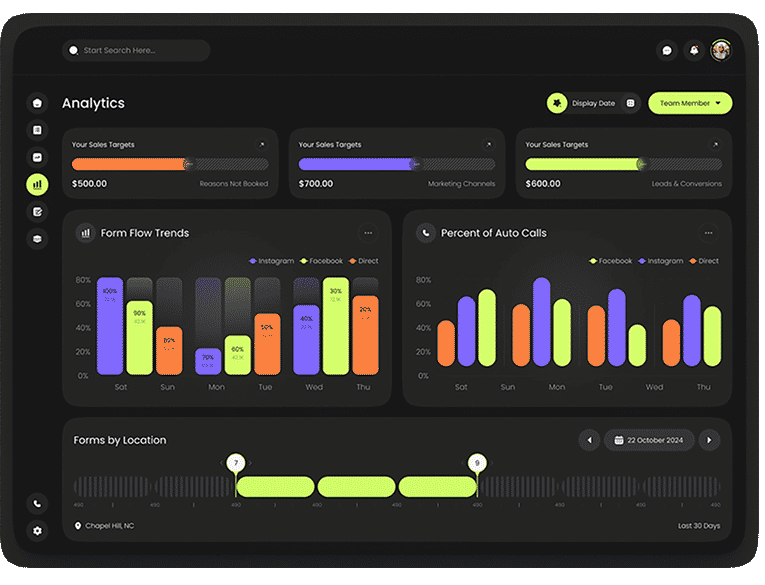
Four shipped screens cover the clinic overview, leads and conversion, marketing channels and analytics. They are the baseline for the retrospective reporting definitions.
2025 · Design Lead · 4-person team · Shipped
I owned end-to-end product design for this shipped CRM product as Design Lead. Below are the clinic-reporting dashboards as they shipped, followed by what I’d change next. Figures shown are sample data.
Explore the shipped screens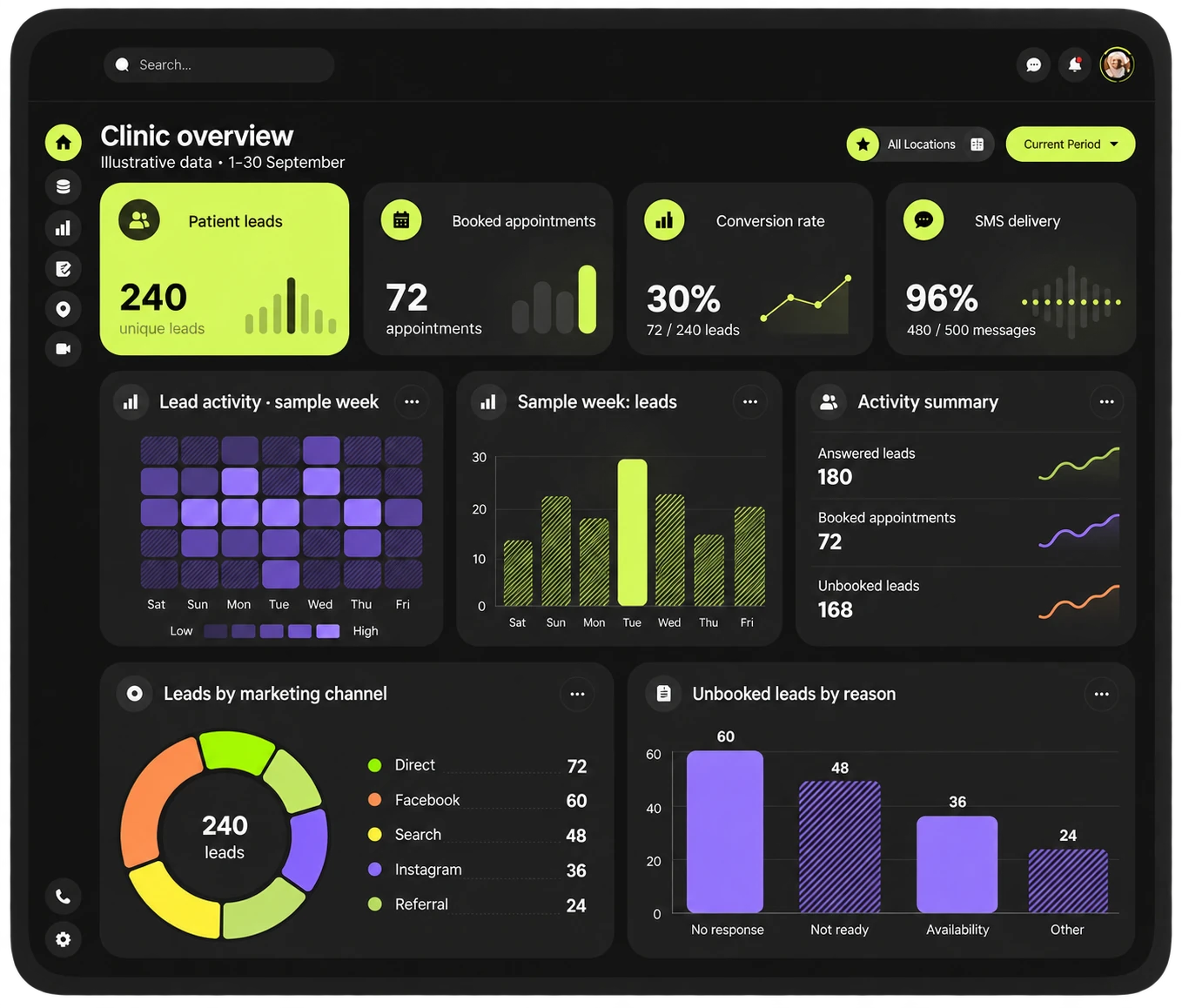
Retrospective revision · sample data
PROJECT AT A GLANCE
See the project record for what I designed and what I’d change next. Project record
Chapters Swipe or scroll for more
01 / CONTEXT
In 2025, I owned end-to-end product design for FluxCRM as Design Lead within a four-person project team. The product shipped. The shipped dashboards come first here; the metric definitions and follow-up flow that close the page are my retrospective thinking on what I’d change next.
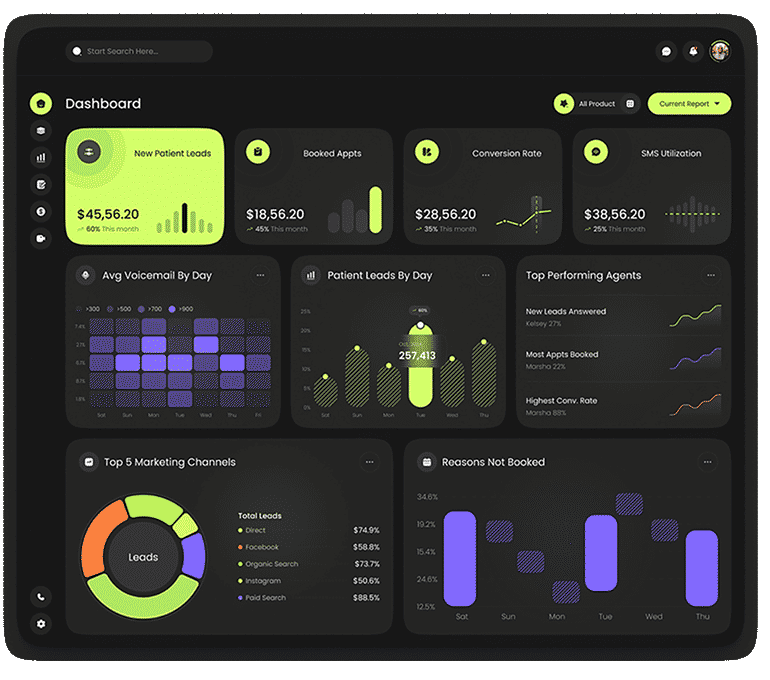
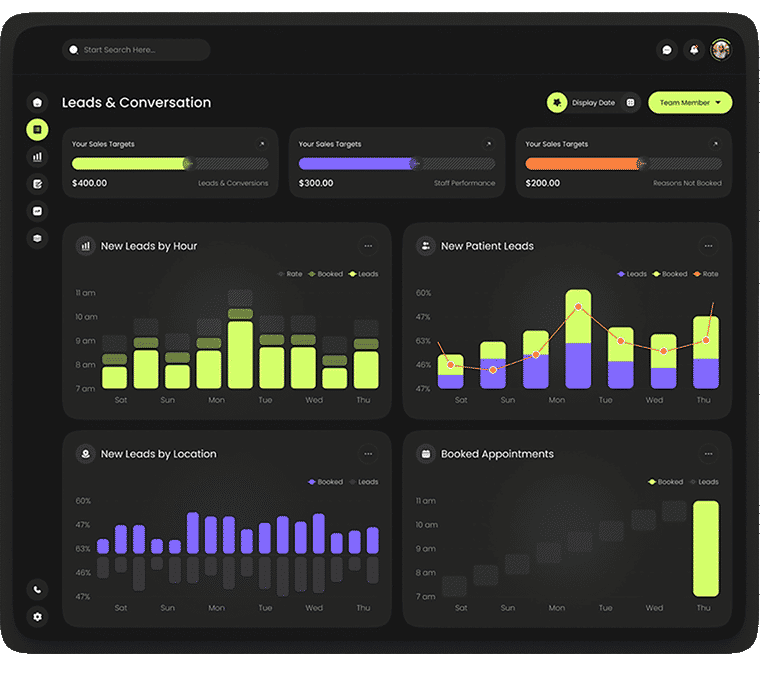
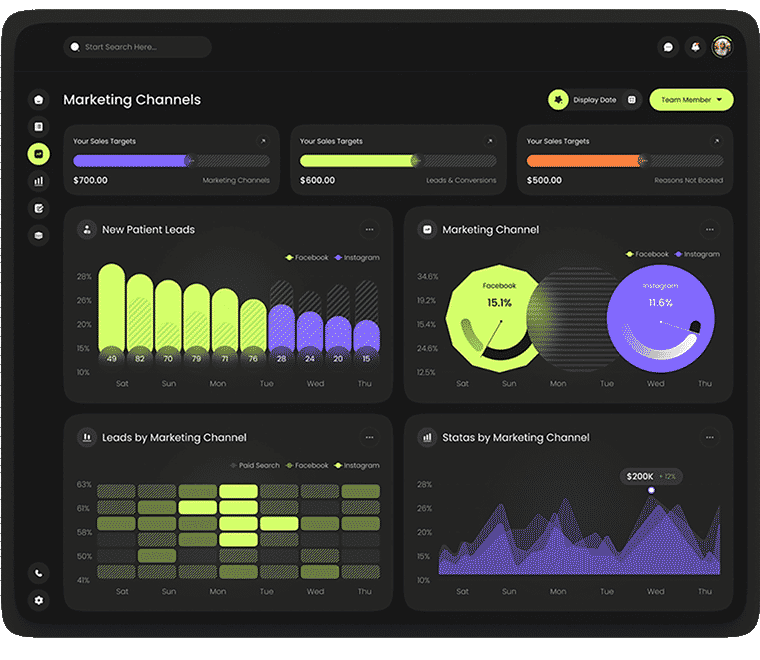
I designed FluxCRM’s clinic reporting as four views: overview, leads and conversion, marketing channels and analytics. Together they cover the reporting surface across acquisition, bookings and channel activity. The screens below keep their shipped labels and values.
02 / SCREEN REVIEW
THE PRODUCT
The four shipped dashboards are below. My retrospective reporting revision follows the project record.
FROM THE PROJECT FILES
These four screens come from the FluxCRM project board. Only the presentation background is masked; the shipped labels and currency-like metric values are unchanged. Values shown are sample data.
SCREEN DETAILS / INTERFACE REVIEW
What the shipped clinic reporting screens cover, and where my definitions would go next.
Four shipped screens cover the clinic overview, leads and conversion, marketing channels and analytics. They are the baseline for the retrospective reporting definitions.
Currency-like formatting and lead-count labels sit side by side in the shipped overview cards.
My revision separates counts from rates and states the reporting period and denominators. These definitions are post-launch thinking, not part of the shipped product.
The first two notes describe what shipped; the third is retrospective.
03 / PROJECT RECORD
The project facts, the shipped screens, and the questions I’d test next.
End-to-end product design as Design Lead in 2025, in a four-person team; the product shipped. The four dashboards above are the shipped screens. The metric definitions and follow-up schematic below are my retrospective proposals, not shipped features.
The unit formatting on the overview cards, and the gap between seeing unbooked leads and acting on them. Any follow-up flow would also need permissions and privacy controls designed alongside it.
04 / RETROSPECTIVE
A lead count, a booking count and a conversion rate are not interchangeable. Looking back, I’d define their relationship first, then add a route from an unbooked group to follow-up. Values shown are sample data.
Scroll across the enlarged screen. Keyboard users can focus the image area and use the arrow keys.
Retrospective, not shipped. Everything in this section is post-launch thinking; the labels below mark each proposal.
Sample reporting period: 1–30 September
72 booked ÷ 240 eligible leads × 100 = 30%. Count unique leads in the same period; exclude duplicates. Values are sample data. The overview uses the same definitions throughout this case study.
One reporting period, explicit units and defined denominators. All values are sample data.
WHAT I’D CHANGE NEXT
Present the current metrics and charts as a periodic review. This preserves breadth, but leaves the user to connect conversion gaps to follow-up.
Use consistent units and a shared reporting period, then expose unbooked lead groups and their next permitted action. Keep personal details behind appropriate access controls.
Direction B is the proposed next iteration because it connects a visible conversion problem to an operational task. Both directions are post-launch options, not shipped alternatives.
PROPOSED REFINEMENT
Actionable groups introduce more detail and privacy responsibilities. Show only the minimum patient information required for the task, and validate permissions before introducing follow-up actions.
Schematic of a proposed refinement · not a shipped screen.
Proposed hierarchy for the clinic view, shown as definitions only.
Ask a clinic operator to identify the largest booking gap and explain the next follow-up. Check that they read the units correctly and can distinguish a rate from a total.
Use these questions to evaluate the next iteration.
The decision is to distinguish counts from rates: leads and bookings are counts, while conversion uses eligible leads as its denominator. Unbooked leads connect the overview to follow-up. Values are sample data.
Agree the reporting period and eligibility rules with a clinic operator, then ask them to explain the booking gap and the next permitted follow-up. Test whether they distinguish counts from rates. Validate access requirements separately with the people responsible for patient data.
Test the revised overview with clinic operators: can they explain the difference between a lead count, a booking count and conversion? That answer decides whether the revision is ready to build.